Web Ping: Difference between revisions
Tags: Mobile edit Mobile web edit |
m Text replacement - ": Image:Owl icon.jpg " to "{{Tips}} " |
||
| (2 intermediate revisions by the same user not shown) | |||
| Line 79: | Line 79: | ||
* [http://www.labnol.org/internet/blogging/test-website-blocked-in-china-or-accessible/3262/ How to Check If Your Website Is Blocked In China or Not] | * [http://www.labnol.org/internet/blogging/test-website-blocked-in-china-or-accessible/3262/ How to Check If Your Website Is Blocked In China or Not] | ||
{{Tips}} 了解什麼是[http://zh.wikipedia.org/wiki/%E9%87%91%E7%9B%BE%E5%B7%A5%E7%A8%8B 中國的防火長城(GFW, Great Firewall of China)]? | |||
==== 使用國外 VPN 服務測試網路連線 ==== | ==== 使用國外 VPN 服務測試網路連線 ==== | ||
| Line 89: | Line 89: | ||
=== 分析網頁連線下載速度 === | === 分析網頁連線下載速度 === | ||
分析網頁連線下載速度,並提供網站開發者建議的服務或軟體 | |||
[[Optimize webpage speed]] | |||
=== Monitor HTTP request === | |||
追蹤瀏覽器提出的網站網址要求(ex: URL of AJAX JSON) | 追蹤瀏覽器提出的網站網址要求(ex: URL of AJAX JSON) | ||
* [http://www.fiddler2.com/fiddler2/ Fiddler Web Debugger - A free web debugging tool] for {{Win}} | * [http://www.fiddler2.com/fiddler2/ Fiddler Web Debugger - A free web debugging tool] for {{Win}} | ||
| Line 120: | Line 98: | ||
* [http://www.httpwatch.com/ HttpWatch 8.5: Seamless HTTP monitoring for IE and Firefox] for {{IE}} & {{Fx}} | * [http://www.httpwatch.com/ HttpWatch 8.5: Seamless HTTP monitoring for IE and Firefox] for {{IE}} & {{Fx}} | ||
* {{Chrome}} 工具 -> 開發人員工具 -> Network | * {{Chrome}} 工具 -> 開發人員工具 -> Network | ||
=== 觀察HTTP response status code(HTTP回應狀態代碼) === | === 觀察HTTP response status code(HTTP回應狀態代碼) === | ||
| Line 175: | Line 150: | ||
== 無法網路連線 == | == 無法網路連線 == | ||
To distinguish which section met trouble | |||
# ping local IP | # ping local IP | ||
# ping Gateway | # ping Gateway | ||
# check DNS... | # check DNS... | ||
# | # ping the remote IP of external website<ref>[https://www.wkb.idv.tw/moodle/mod/page/view.php?id=10467&lang=zh_tw IPv6_2017: IPv6連線互測-ping]</ref> (有些機器會關閉ICMP ECHO,讓我們無法Ping到它) | ||
#* {{Win}} keyin {{kbd | key=<nowiki>ping <IPv4></nowiki>}} e.g. {{kbd | key=<nowiki>ping 8.8.8.8</nowiki>}} (8.8.8.8 is the IP of [https://developers.google.com/speed/public-dns/docs/using?hl=zh-tw Google Public DNS]) | |||
#* {{Win}} keyin {{kbd | key=<nowiki>ping -6 <IPv6></nowiki>}} e.g. {{kbd | key=<nowiki>ping -6 2001:4860:4860::8888</nowiki>}} | |||
== 無法連線到網路的測試步驟 == | == 無法連線到網路的測試步驟 == | ||
Latest revision as of 20:22, 8 January 2025
Test connectivity for the web service: 網站監測與網站連線測試,當網站臨時無法連線時,可以檢查是否是個別 ISP 或 網路環境造成的網路連線問題。 (Back to Network problem)
網站連線測試[edit]
網站連線測試[edit]
同時從世界各處測試網站連線 手動執行監測[edit]
可以檢查是否是個別 ISP / 網路環境造成的網路連線問題: 如果只有你不能連線,世界其他人都可以連線,請更換網路連線 IP ,例如更改無線網路重新連線網站。
 Free Speed Test for Internet Access and Website Speed : FreeSpeedTest.com 從世界10處(含中國北京)進行連線速度測試 via 測試你的網站在世界各地的連線速度 | 艾德的部落格天空
- 含地圖; 相同公司的替代服務網站: InternetSupervision Website Monitoring Services
- Down for everyone or just me? 介面簡單好用,但未說明從何處進行連線測試 (介紹)
- FreeSiteStatus 網站監測、主機監測服務 從世界10處,橫跨北美、歐洲、亞洲 (不含中國) 等處,進行連線測試。監測地點詳監測網路。 (sample) [Last visited: 2017-03-29]
- Alertra Web Site Monitoring
- (1)從世界13處(含中國上海、香港)進行連線速度測試 check from different citys: Los Angeles USA, Detroit USA, Frankfurt GERMANY and London UK. 。
- (2) 免費版未提供 2014-02-25 可查看網頁回應:輸入網頁網址,然後點選 Response -> View Extended Data (Headers, content and more) 可以看到網頁內容,不過中文內容會亂碼。 另外提供 View Packet Capture (.cap file in pcap/Wireshark format)
- HostTracker - Website Uptime Monitoring Service 從世界33處(不含中國)進行連線測試,並提供30天Email訂閱試用 (測試結果, 2007-09-24)
- Check server: Check host - online website monitoring, Check IP
- 從世界18處(含中國香港)進行連線速度測試 [Last visited: 2015-08-01]
- Pingdom Tools: full page test: 測試網頁載入時間(Full page test),以及Pingdom Tools: Ping and traceroute則提供 Pingdom Tools網站到目標網站的連線檢查。
- Saycoo Website Monitoring: Quick Test Network Tools 從USA, UK, Netherlands, Singapore, Australia等處(不含中國)進行連線測試, 僅會顯示是否ok, 不會顯示回應時間 (access: 20090227)
- WebSitePulse -> 1. Free Website Test: Test from (1)Seattle, WA (2)Munich, Germany (3)Brisbane, Australia 2. 選擇 Web Page Test,可概略呈現地網頁元素下載的所需時間
- Monitority - FREE Website Monitoring (Alerts via Email, SMS, Twitter) duration: 20 seconds, 1 minute ... [Last visited: 2015-08-24]
- Features claimed "Multiple geographic locations"
- just ping: Free online ping from 50 locations worldwide(includes China)
 如果網站關閉 ICMP 回應,會導致測試結果顯示為「Packets lost (100%)」,但是其實網站是可以連線的。[Last visited: 2013-05-13]
- DNS Checker - DNS Check Propagation Tool [Last visited: 2019-02-02]
- Website Availability Test - Uptrends [Last visited: 2020-03-11]
- Website Down Checker: Down for everyone or Just you? [Last visited: 2022-06-18]
同時從世界各處測試網站連線 固定頻率自動執行監測[edit]
- Uptime Robot 免費與付費版均有。主要從美國伺服器連線測試[1]。免費版監控週期 5 分鐘、共 50 個監控規則的限制。 [Last visited: 2022-07-14]
- Alertra Web Site Monitoring
- (1)從世界13處(含中國上海、香港)進行連線速度測試 check from different citys: Los Angeles USA, Detroit USA, Frankfurt GERMANY and London UK. 。
- (2) 免費版未提供 2014-02-25 可查看網頁回應:輸入網頁網址,然後點選 Response -> View Extended Data (Headers, content and more) 可以看到網頁內容,不過中文內容會亂碼。 另外提供 View Packet Capture (.cap file in pcap/Wireshark format)
- Monitor — Jetpack for WordPress 教學: Jetpack Monitor 免費 24/7 網站監測服務,WordPress 無法連線自動發送提醒 (免費資源網路社群)[Last visited: 2014-04-05]
- pulsetic 免費與付費版均有。免費版監控週期 5 分鐘。無法設定要從世界哪一處進行連線測試。[Last visited: 2022-04-08]
- 卡卡網—在線網速測試|網速檢測|網站速度檢測|網站速度測試平台 www.webkaka.com: 美國、澳大利亞、日本、法國、中國等地方測試。 教學: 卡卡網 - 從中國大陸13個檢測點、美國、澳洲和日本測試網站速度 | 免費資源網路社群
- HostTracker - Website Uptime Monitoring Service 從世界33處(不含中國)進行連線測試,並提供30天Email訂閱試用 (測試結果, 2007-09-24)
- WebSitePulse -> 1. Free Website Test: Test from (1)Seattle, WA (2)Munich, Germany (3)Brisbane, Australia 2. 選擇 Web Page Test,可概略呈現地網頁元素下載的所需時間
- Uptime Doctor 免費與付費版均有。自北美、歐洲、亞洲等地方測試。 [Last visited: 2017-05-31]
- StatusCake 免費與付費版均有。自世界各處伺服器[2]隨機一處測試。免費版監控週期 5 分鐘、共 10 個監控規則的限制[3]。。教學: StatusCake 免費網站監控服務,斷線自動以 Email、簡訊、Skype 通知用戶 [Last visited: 2018-10-08]
- 軟體 VisualRoute traceroute server: trace IP address, trace route, IP trace, IP address locations 測試從VisualRoute到目標網站的連線能力 (含地圖)
檢查網站是否被中國的防火長城(GFW, Great Firewall of China)封鎖[edit]
- WebSitePulse -> Website Test behind the Great Firewall of China。從北美、南美、歐洲、亞洲、非洲等處連線測試[4]。
- 卡卡網—在線網速測試|網速檢測|網站速度檢測|網站速度測試平台 www.webkaka.com: 特色是除了國外的點,還從中國境內多處連線測試 [Last visited: 2015-07-10]
- Great Firewall of China 從中國內5處連線測試 [Last visited: 2015-07-10]
- 中国的网络审查 | GreatFire.org [Last visited: 2015-04-08] 如果連線逾時,網頁會很久沒有回應。 [Last visited: 2015-07-10]
- 监控宝 HTTP工具 從中國、歐美等處連線測試 如果連線逾時,網頁會很久沒有回應。 [Last visited: 2015-07-10]
- chinaz 135 個檢測點 [Last visited: 2017-08-10]
- DNS Checker - DNS Check Propagation Tool [Last visited: 2019-02-02]
- 使用時網站沒有反應 just ping: Free online ping from 50 locations worldwide(includes China) [Last visited: 2015-07-10]
相關文章

使用國外 VPN 服務測試網路連線[edit]
- Hotspot Shield 美國
- brower testing tool by VM which located at US: User_agent#testing_desktop_browsers_and_mobile_browsers
其他[edit]
- CloudPing.info "... estimate the latency from your browser to each Amazon Web Services region." Cited from official website.
分析網頁連線下載速度[edit]
分析網頁連線下載速度,並提供網站開發者建議的服務或軟體 Optimize webpage speed
Monitor HTTP request[edit]
追蹤瀏覽器提出的網站網址要求(ex: URL of AJAX JSON)
- Fiddler Web Debugger - A free web debugging tool for Win

- Firebug for Firefox

- HttpWatch 8.5: Seamless HTTP monitoring for IE and Firefox for IE
 & Firefox
 - Chrome
 工具 -> 開發人員工具 -> Network


觀察HTTP response status code(HTTP回應狀態代碼)[edit]
瀏覽網頁時,可以觀察該網頁或網頁內元件(例如嵌入圖檔或聲音)的HTTP response status code(HTTP回應狀態代碼)[5],例如404代表沒有該檔案。
- Mozilla Firefox Firefox 內建的工具 -> 網頁開發者 -> 網頁主控台。快速鍵: Ctrl+Shift+k。
- filter: available
- example as follows:
[23:14:47.836] GET https://www.google.com/ [HTTP/1.1 200 OK 10763ms]
[23:14:59.707] GET https://www.google.com/ig/cp/get?hl=zh-TW&gl=&authuser=0&bundleJs=0 [HTTP/1.1 304 Not Modified 1593ms]
- Firebug for Firefox : 切換到「網路」標籤。快速鍵: F12
- Google Chrome 內建的工具 -> 開發人員工具 -> 切換到「network」標籤。快速鍵: Ctrl+Shift+i
- Live HTTP Headers for Firefox
- curl on Linux
 or macOS
  e.g. curl -v -o /dev/null https://www.slideshare.net [6]

DNS 檢查[edit]
websites
- What's My DNS? Global DNS Propagation Checker [Last visited: 2020-03-24] 介紹: What’s My DNS? 從世界各地的伺服器,檢查網址 DNS 更新情形
- DNS Checker - DNS Check Propagation Tool 從世界各地的伺服器,檢查網址 DNS 解析 [Last visited: 2020-03-24]
- Global DNS Propagation Checker - Nslookup Tool 從世界各地的伺服器,檢查網址 DNS 解析,並顯示對應 IP
- IntoDNS "IntoDNS checks the health and configuration and provides DNS report and mail servers report." Quoted from official website. [Last visited: 2011-02-21] https://planetoid.info/images/Icon_exclaim.gif不能檢查 subdomain
- Free DNS Report [Last visited: 2017-04-10]
- SMTP MX Lookup Tool - Check your DNS MX Records online - MxToolbox [Last visited: 2017-04-10]
- DNS Inspect - Free DNS checking tool with IPv6 support "checks your domain's servers for common DNS and mail errors and generates a report with explanations how to fix them."
- 2019 | DNS flag day [Last visited: 2019-02-02]
- Domain tester [Last visited: 2019-05-06]
tools
- nslookup for Win & Linux syntax: nslookup domain.com
- How to Change DNS from Command Line of Mac OS X on macOS
- command line - How can I direct a query to specific DNS server? - Super User on Win
- Linux nslookup command help and examples on Linux
反查IP或網域[edit]
Domain Categorization[edit]
- Cloudflare's categorization e.g. Cloudflare Radar of apple.com
偵測使用的 CDN[edit]
偵測使用的 CDN (內容傳遞網路, Content Delivery Network或Content Distribution Network)
- What's My CDN? 偵測 CDN 不能選 Global,可以選 By Region: Asia
- WHOIS IP Lookup Tool | UltraTools
- IP Location Finder - IP Lookup With Detailed Geolocation Data | KeyCDN Tools
references
無法網路連線[edit]
To distinguish which section met trouble
- ping local IP
- ping Gateway
- check DNS...
- ping the remote IP of external website[7] (有些機器會關閉ICMP ECHO,讓我們無法Ping到它)
- Win keyin ping <IPv4> e.g. ping 8.8.8.8 (8.8.8.8 is the IP of Google Public DNS)
- Win keyin ping -6 <IPv6> e.g. ping -6 2001:4860:4860::8888
- Win
無法連線到網路的測試步驟[edit]
- 檢查網站服務 for Linux
- /etc/init.d/httpd status
- /etc/init.d/mysqld status
- 檢查本機端網站網頁是否能讀取
- lynx 127.0.0.1
- 檢查網站伺服器log
- 從瀏覽器直接瀏覽網站網址
- 透過命令列模擬瀏覽器瀏覽網站 e.g. curl -v -o /dev/null https://www.slideshare.net
網路連線發生不穩[edit]
如何看出哪一段線路慢了?
- Windows: 開始 -> 執行 -> 輸入cmd (進入"命令提示字元")
- (會顯示C:\某資料夾>)
- 請在閃爍游標處輸入 tracert web.domain.com (web.domain.com 改成想檢查的網站網址)
- 就可以看出是哪一段慢了,大家先作這個動作會有助於解決問題及增加回覆的速度喔
或者
- 請在閃爍游標處輸入 tracert web.domain.com > c:\result.txt
- 當出現第二次C:\某資料夾> (如果網路連線不穩定, 會花費相當多時間)
- 代表已經將連線過程紀錄成功在 c:\result.txt
- 請將這個文字檔寄給合適的網路管理員
參考資料
- 如何使用 TRACERT 疑難排解 Windows 中的 TCP/IP 問題(使用ICMP協定, 可能因為對方伺服器關閉ICMP回應, 而影響測試結果)
類似工具[edit]
GeoIP服務[edit]
- Geo IP Tool (含地圖)
- My IP Address Lookup / IP Locator / Trace IP / What is my ip (含地圖)
- IP Address Lookup (IPv4 & IPv6)
Blog[edit]
- Is My Blog Working? "Enter your blog address above to check your server status, RSS feed, markup, security, and performance." (圖例)
伺服器主機資訊或採用的技術[edit]
伺服器主機資訊或採用的技術,例如網站伺服器、 Javascript 框架、網頁框架、網頁字型 (web fonts)、程式語言等
- BuiltWith Technology Lookup
- 使用方式: (1) 瀏覽器擴充套件、(2)線上輸入網址查詢、或 (3) 直接使用 bookmarklet
javascript:location = 'https://builtwith.com/'+location.href.replace(/https?:\/\//i, "");
- 介紹:
- 查詢結果: e.g. techcrunch.com Technology Profile of techcrunch.com [Last visited: 2017-05-28]
- 使用方式: (1) 瀏覽器擴充套件、(2)線上輸入網址查詢、或 (3) 直接使用 bookmarklet
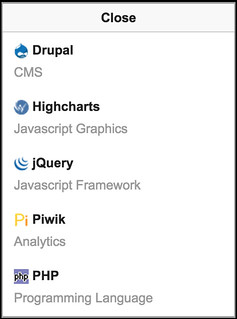
- Wappalyzer - Identify technologies on websites "Wappalyzer uncovers the technologies used on websites." Quoted from website.
- 使用方式: (1) 安裝瀏覽器擴充套件、或 (2) 直接使用 bookmarklet。
- 介紹: 「Wappalyzer」網站照妖鏡!一鍵顯示網站所用的主機、平台、語言與框架|梅問題.教學網
- 查詢結果: 如下圖
- (image hosted by flickr)
- Netcraft - Search Web by Domain 可查詢伺服器主機的OS、IP及上線時間(uptime)、採用的技術等資訊。
- 使用方式: (1) 線上輸入網址查詢、或 (2) 直接使用 bookmarklet
javascript:location%20=%20'http://toolbar.netcraft.com/site_report?url='+escape(location);%20void%200
- 介紹:
- 查詢結果: e.g. Site report for techcrunch.com
- 使用方式: (1) 線上輸入網址查詢、或 (2) 直接使用 bookmarklet
伺服器主機上線時間(uptime)[edit]
- Netcraft可查詢伺服器主機的OS、IP及上線時間(uptime)、採用的技術等資訊。 [Last visited: 2017-05-31]
- Webhost Ranking - Uptime Doctor e.g. Virtual Private Hosting | Webhost Ranking - Uptime Doctor [Last visited: 2017-05-31]
伺服器啟用 HTTP 壓縮 (HTTP Compression)[edit]
檢查伺服器是否啟用 HTTP 壓縮 的服務
- WhatsMyIP.org | HTTP Compression Test 允許輸入 IP 網址 [Last visited: 2017-03-20]
- Check GZIP compression ex: google.com is gzip compressed 不允許輸入 IP 網址,會遇到「error 15 - website address contains an invalid domain extension」錯誤訊息。 [Last visited: 2017-03-20]
Benchmark
- HTTP Archive 從 Alexa 取得前 100萬名的網站網址清單,分析其網頁載入時間、使用的JS、圖片、字型所需載入檔案大小。[Last visited: 2016-04-24]
伺服器啟用 HTTP/2[edit]
檢查伺服器是否啟用 HTTP/2
SSL Server Test[edit]
定期檢查 SSL 憑證的線上服務
- Secure Certificate Monitoring - LetsMonitor.org [Last visited: 2023-02-17]
SSL 憑證測試線上掃描服務
- SSL Server Test (Powered by Qualys SSL Labs): Example report of SSL Report: certbot.eff.org [Last visited: 2022-05-11]
- SSL Checker - SSL Certificate Verify: Example report of SSL Checker - SSL Certificate Verify [Last visited: 2017-08-29]
- OpenSSL Command Line Utilities [Last visited: 2017-02-21]
- Testing for Weak SSL/TLS Ciphers, Insufficient Transport Layer Protection (OTG-CRYPST-001) - OWASP [Last visited: 2017-09-04]
- RapydBlok INSPECT - Audit SSL|TLS Security 報告看起來跟 drwetter/testssl.sh: Testing TLS/SSL encryption anywhere on any port 提供的一樣 [Last visited: 2021-09-11]
SSL 憑證測試掃描工具
- drwetter/testssl.sh: Testing TLS/SSL encryption anywhere on any port License: GNU General Public License v2.0
追蹤網站內容更新或變化[edit]
References[edit]
- ↑ Locations and IPs | Uptime Robot
- ↑ What Locations Do You Have | Knowledge Base
- ↑ Our Pricing | Yearly Website Monitoring Pricing | StatusCake | StatusCake - Website Monitoring
- ↑ WebSitePulse Monitoring Network [Last visited: 2015-07-10]
- ↑ HTTP/1.1: Status Code Definitions
- ↑ 中華電信有線網路無法連到 slideshare 的測試 - asciinema
- ↑ IPv6_2017: IPv6連線互測-ping
further reading
- HTTP 451 - Wikipedia, the free encyclopedia [Last visited: 2016-06-28] HTTP 451 Unavailable For Legal Reasons / 因法律原因無法訪問
Web site design and development process
- Information gathering: Research surveys
- Planning: Before you start to build a website, Content development strategy | Register domain name, Choose web hosting | Information architecture | Data model: Data type, Data flow | Documentation: Request For Proposal | Licensing
- Design: CSS tools, Free fonts, Free photos, Emoji & icons
- Testing & delivery: Usability test, check browser compatibility | Web testing | Speed up websites: Web Ping, Software acceptance test plan | Promote your web
- Maintenance: Site backup & restore test, Software update (OS patch or CMS security update)
- Need help? Community, I need inspiration, Web design glossary