Xpath tools
List of tools for xpath expression selection/query
Comparison of xpath tools
| Method | Pros | Cons |
|---|---|---|
| chrome extension XPath Helper | worked on online webpage | NOT work on offline file |
| Sublime xpath plugin | worked on offline file | NOT work on online webpage |
chrome javascript console
Chrome  javascript console
- 選單: 工具 -> 開發人員工具 -> Console
- 確認符合 XPath 規則的結果,例如 XPath 規則是 "//img",可在 Console 輸入 $x("//img") ,按 Enter。就會顯示符合 xpath 規則的結果[1][2]:
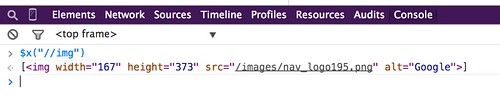
image hosted by flickr
chrome extension
- 輸入 ctrl + shift + x 或點選工具列上的 x 圖示,開啟 XPath Helper console (顯示在網頁上方)
- 輸入 xpath 規則。就會凸顯符合 xpath 規則的網頁元件地方

image hosted by flickr
- After adding it to browser, restart the browser. 安裝後,重新啟動瀏覽器
- Open DevTools. 打開「開發人員工具」
- Click on SelectorsHub tab. 點選「元素」標籤,再點選最右邊的「SelectorsHub」
- Here it will show all possible xpath, selectors for inspected element.
- To build your own xpath or CSS Selector, start typing in the selector input box.
Natu WebSync - Chrome 線上應用程式商店
- 開啟「開發人員工具」
- 點選標籤「WebSync」-> 輸入 xpath 規則
firefox extension
Firebug + FirePath for Firefox 
- 選單: 工具 --> 網頁開發者 --> Firebug --> 開啟 Firebug
- 切換到 FirePath 標籤
- 輸入 xpath 規則。就會凸顯符合 xpath 規則的網頁元件地方
Sublime text editor
xpath plugin: "Sublime Text plugin for easier cursor navigation of XML and HTML files using XPath 1.0."
Steps
- Open the Command Palette
- Menu: Tools -> Command Palette
- or press the keyboard shortcut[3]: ctrl + shift + p on Win
 or command + shift + p on macOS
  )
)
- and select Xpath: Query document
- input the Xpath expression

Other tools
- XPath Expression Tester for XML [Last visited: 2020-06-09]
- Free Online XPath Tester / Evaluator for XML [Last visited: 2020-06-09]
- XPath online real-time tester, evaluator and generator for XML & HTML [Last visited: 2023-03-22]
Xpath syntax examples
- SVG //*[local-name() = 'svg']
- SVG elements //*[name()='svg']//*[name()='YOUR OBJECT'] [4]
References
- References
- ↑ Is there a way to get the xpath in google chrome? - Stack Overflow
- ↑ Evaluate and validate XPath/CSS selectors in Chrome Developer Tools | Yi Zeng’s Blog
- ↑ sublimetext3 - Sublime Text - XPath Plugin shortcut - Stack Overflow
- ↑ java - How to use xPath in Selenium WebDriver to grab SVG elements? - Stack Overflow
Related articles
Troubleshooting of ...
- PHP, cUrl, Python, selenium, HTTP status code errors
- Database: SQL syntax debug, MySQL errors, MySQLTuner errors or PostgreSQL errors
- HTML/Javascript: Troubleshooting of javascript, XPath
- Software: Mediawiki, Docker, FTP problems, online conference software
- Test connectivity for the web service, Web Ping, Network problem, Web user behavior, Web scrape troubleshooting
Template