Xpath tools: Difference between revisions
| Line 34: | Line 34: | ||
Steps | Steps | ||
# Menu: Tools -> Command Palette | # Open the Command Palette | ||
# Xpath: Query document | #* Menu: Tools -> Command Palette | ||
# input Xpath expression | #* or press the keyboard key: {{kbd | key=ctrl + shift + p}} on {{Win}} or {{kbd | key=command + shift + p}} on {{Mac}}) | ||
# and select {{kbd | key=Xpath: Query document}} | |||
# input the Xpath expression | |||
== Other tools == | == Other tools == | ||
Revision as of 11:07, 13 July 2021
List of tools for xpath expression selection/query
chrome javascript console
Chrome  javascript console
- 選單: 工具 -> 開發人員工具 -> Console
- 確認符合 XPath 規則的結果,例如 XPath 規則是 "//img",可在 Console 輸入 $x("//img") ,按 Enter。就會顯示符合 xpath 規則的結果[1][2]:
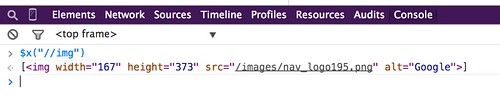
image hosted by flickr
chrome extension
- 輸入 ctrl + shift + x 或點選工具列上的 x 圖示,開啟 XPath Helper console (顯示在網頁上方)
- 輸入 xpath 規則。就會凸顯符合 xpath 規則的網頁元件地方

image hosted by flickr
Natu WebSync - Chrome 線上應用程式商店
- 開啟「開發人員工具」
- 點選標籤「WebSync」-> 輸入 xpath 規則
firefox extension
Firebug + FirePath for Firefox 
- 選單: 工具 --> 網頁開發者 --> Firebug --> 開啟 Firebug
- 切換到 FirePath 標籤
- 輸入 xpath 規則。就會凸顯符合 xpath 規則的網頁元件地方
Sublime text editor
xpath - Packages - Package Control: "Sublime Text plugin for easier cursor navigation of XML and HTML files using XPath 1.0."
Steps
- Open the Command Palette
- Menu: Tools -> Command Palette
- or press the keyboard key: ctrl + shift + p on Win
 or command + shift + p on macOS
  )
)
- and select Xpath: Query document
- input the Xpath expression

Other tools
- XPath Expression Tester for XML [Last visited: 2020-06-09]
- Free Online XPath Tester / Evaluator for XML [Last visited: 2020-06-09]
References
- References
Related articles
Troubleshooting of ...
- PHP, cUrl, Python, selenium, HTTP status code errors
- Database: SQL syntax debug, MySQL errors, MySQLTuner errors or PostgreSQL errors
- HTML/Javascript: Troubleshooting of javascript, XPath
- Software: Mediawiki, Docker, FTP problems, online conference software
- Test connectivity for the web service, Web Ping, Network problem, Web user behavior, Web scrape troubleshooting
Template