Xpath tools: Difference between revisions
No edit summary |
|||
| Line 4: | Line 4: | ||
{{chrome}} javascript console | {{chrome}} javascript console | ||
# 選單: 工具 -> 開發人員工具 -> Console | # 選單: 工具 -> 開發人員工具 -> Console | ||
# 輸入 {{kbd | key = <nowiki> $x("//img") </nowiki>}},按 Enter。就會顯示符合 xpath 規則的結果<ref>[http://stackoverflow.com/questions/3030487/is-there-a-way-to-get-the-xpath-in-google-chrome Is there a way to get the xpath in google chrome? - Stack Overflow]</ref>: | # 確認符合 XPath 規則的結果,例如 XPath 規則是 {{kbd | key = <nowiki>"//img"</nowiki>}},可在 Console 輸入 {{kbd | key = <nowiki> $x("//img") </nowiki>}},按 Enter。就會顯示符合 xpath 規則的結果<ref>[http://stackoverflow.com/questions/3030487/is-there-a-way-to-get-the-xpath-in-google-chrome Is there a way to get the xpath in google chrome? - Stack Overflow]</ref>: | ||
https://farm4.staticflickr.com/3886/15103179455_c452b70923.jpg | https://farm4.staticflickr.com/3886/15103179455_c452b70923.jpg | ||
Revision as of 16:11, 12 May 2018
Tools for xpath selection
chrome javascript console
Chrome  javascript console
- 選單: 工具 -> 開發人員工具 -> Console
- 確認符合 XPath 規則的結果,例如 XPath 規則是 "//img",可在 Console 輸入 $x("//img") ,按 Enter。就會顯示符合 xpath 規則的結果[1]:
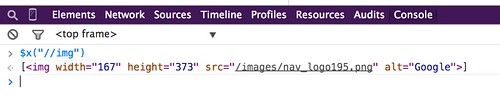
image hosted by flickr
chrome extension
- 輸入 ctrl + shift + x 開始 XPath Helper console
- 輸入 xpath 規則。就會凸顯符合 xpath 規則的網頁元件地方

image hosted by flickr
firefox extension
Firebug + FirePath for Firefox 
- 選單: 工具 --> 網頁開發者 --> Firebug --> 開啟 Firebug
- 切換到 FirePath 標籤
- 輸入 xpath 規則。就會凸顯符合 xpath 規則的網頁元件地方
references
Troubleshooting of ...
- PHP, cUrl, Python, selenium, HTTP status code errors
- Database: SQL syntax debug, MySQL errors, MySQLTuner errors or PostgreSQL errors
- HTML/Javascript: Troubleshooting of javascript, XPath
- Software: Mediawiki, Docker, FTP problems, online conference software
- Test connectivity for the web service, Web Ping, Network problem, Web user behavior, Web scrape troubleshooting
Template