Total Commander
Total Commander is the software for file management. The customized layout (two columns) I suggested was as follows:
| Total Commander | v.7.50 |
Quick to rename file name with F2
Step 1: Configuration --> Options --> Operation: Select only the file name when renaming (not the extension)
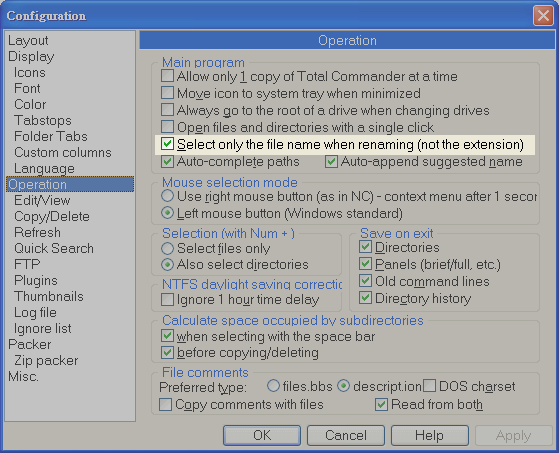
- Courtesy of image hosting: flickr
Step 2: Configuration --> Options --> Misc: Hotkey: F2 mapping to the command cm_RenameOnly --> click the green V to apply the configuration
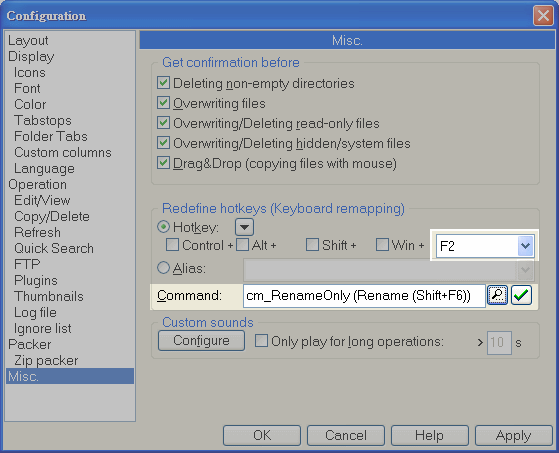
- Courtesy of image hosting: flickr
Step 3: Select a file
- Press F2 once: Select only the file name when renaming (not the extension)
- Press F2 twice: Select the file name and the extension when renaming
button bar: quick to copy file name with full path to clipboard

- Courtesy of image hosting: flickr
- Command: cm_CopyFullNamesToClip
- Copy filenames with full path to clipboard
- another command: cm_CopyNamesToClip
- Copy filenames to clipboard
configure custom layout
Caption  Width  Align    Field contents
Name     143    <-       Name
Ext      20     <-       Ext
size     35     ->       [=tc.size.Mbytes]MB ([=tc.size])
date     25     <-       [=tc.writedate.yMD]
access   20     <-       [=tc.accessdate.MD]
- (write) date: the date when the file was written recently
- access date: the date when the file accessed recently ex: the date that the file was just opened
cursor movement mode of Total Commander
New cursor movement mode in the [Configuration] region
- Menu -> Configuration -> Change Settings Files Directly
- Edit c:\windows\WINCMD.INI
- add the following line (note: not insert after this line [left] ...)
[Configuration]
SpecialCursorMovement=3
..
..
[left]
- restart the Total Commander
manual
New cursor movement mode. Sum of the following:
	1: Left key jumps to first file, right key to last
	2: Left key goes one directory up, right key opens directory/archive under cursor.
	4: Override horizontal scrollbar in custom columns view. If this option isn't set, the cursor will jump only to the first file if the horizontal scrollbar is already at the leftmost position.
	8: Jump one page up/down instead of jumping to the first/last file
- (from the official HELP file -> title: Settings in the file wincmd.ini )
- 3 means
- 'Left key' jumps to first file, and press twice 'Left key' will go one directory up
- 'Right key' will open directory/archive under cursor.