FTP problems: Difference between revisions
m 12個修訂 |
|||
| Line 20: | Line 20: | ||
CuteFTP可以登入,但是重複要求密碼 --> 資料連線類型: 請選擇PASV(passive)模式,請見[http://flickr.com/photos/planetoid/1965246/ CuteFtp的設定圖示]。 | CuteFTP可以登入,但是重複要求密碼 --> 資料連線類型: 請選擇PASV(passive)模式,請見[http://flickr.com/photos/planetoid/1965246/ CuteFtp的設定圖示]。 | ||
=== FTP glossary terms === | |||
* user home dir(ectory): the home directory (root path) when user logged into the FTP server | |||
=== permission === | |||
basic permission (from [http://filezilla-project.org/download.php?type=server FileZilla Server]): | |||
* Files: Read | |||
* Directories: List & List Subdirs | |||
case1 : allow user upload file and overwrite the same file uploaded | |||
* Files: Read, Write, Delete, (Append) | |||
case2 (for temporally upload purpose): allow user upload file and overwrite the same file uploaded but cannot see the file list | |||
* Files: Read, Write, Delete, (Append) | |||
* Directories: '''Not allow''' List & List Subdirs | |||
trivial case 1: allow user upload file but can not overwrite the same file uploaded | |||
* Files: Read, Write, (Append) | |||
=== 檔案傳輸失敗 === | === 檔案傳輸失敗 === | ||
Revision as of 23:13, 11 October 2009
FTP連線問題
- 建議使用FTP 傳檔軟體(找軟體)而非Internet Explorer
- 該FTP 伺服器未啟用服務

登入問題
- 有時候密碼在複製的時候,多copy了半形空白,使得密碼輸入錯誤
- 檢查大寫燈是否有亮
- 部分伺服器有同一時間的連線數限制,請關閉多餘連線視窗或連線分頁(label)
可以登入,但是沒法看到目錄清單
可以登入(沒有顯示密碼錯誤的訊息)到ftp伺服器,但是沒法看到目錄清單
- 確定那不是空目錄
- 啟用(或關閉)傳輸模式為Passive模式, 下圖為FileZilla的設定圖示
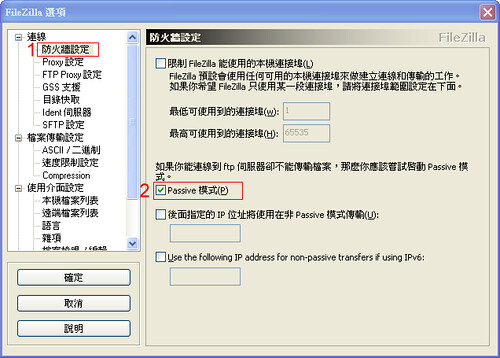
- Image hosted at flickr
- 其他軟體設定: IE的設定圖示、CuteFtp的設定圖示、SmartFTP 2.0 的設定圖示
可以登入,但是重複要求密碼
CuteFTP可以登入,但是重複要求密碼 --> 資料連線類型: 請選擇PASV(passive)模式,請見CuteFtp的設定圖示。
FTP glossary terms
- user home dir(ectory): the home directory (root path) when user logged into the FTP server
permission
basic permission (from FileZilla Server):
- Files: Read
- Directories: List & List Subdirs
case1 : allow user upload file and overwrite the same file uploaded
- Files: Read, Write, Delete, (Append)
case2 (for temporally upload purpose): allow user upload file and overwrite the same file uploaded but cannot see the file list
- Files: Read, Write, Delete, (Append)
- Directories: Not allow List & List Subdirs
trivial case 1: allow user upload file but can not overwrite the same file uploaded
- Files: Read, Write, (Append)
檔案傳輸失敗
可能的原因
- 要傳輸的MS Word檔案還在開啟狀態,建議先關閉MS Word檔,再進行傳輸。
- 部分ftp server不允許中文字、特殊字(例如% @ #)或檔名中有空白等,請使用英文字或數字。
- 副檔名前有多餘的句點,例如 filename..doc 請改成 filename.doc
- 檔名太長
- 部分伺服器有同一時間的連線數限制,請關閉多餘連線視窗或連線分頁(label)
- ftp client的中文支援不佳,導致部分中文字串無法順利判讀
- 網路傳輸品質不穩
- 對方伺服器的硬碟已滿