OpenBiblio: Difference between revisions
I'm a partner in <a href=" http://keepsite.co/keepsiteblog/ ">methotrexate for arthritis</a> The claim system will validate the Special Authority number prior to payment by reference to the <a href |
m Text replacement - "in Chinese" to "in Mandarin Chinese" |
||
| (10 intermediate revisions by 3 users not shown) | |||
| Line 1: | Line 1: | ||
OpenBiblio是[[OpenSource for Educators|開放原始碼]]的圖書管理系統。 | |||
{{Software version | url=http://freshmeat.net/projects/obiblio/ | software=OpenBiblio | version=0.6.0 }} | {{Software version | url=http://freshmeat.net/projects/obiblio/ | software=OpenBiblio | version=0.6.0 }} | ||
== install instruction == | |||
* Check the requirement: PHP 4.2+ & MySQL 4.0.12+ | |||
* Setup the MySQL: {openbiblio}/database_constants.php | |||
< | : more on [http://www.iriti.cnr.it/openbiblio/install_instructions.html OpenBiblio Install Instructions] | ||
* run the <nowiki>http://localhost/openbiblio/install/index.php</nowiki> | |||
== localization == | == localization == | ||
| Line 82: | Line 83: | ||
; Validation | ; Validation | ||
* click the ''Cataloging'' label -> ''New Bibliography'' | * click the ''Cataloging'' label -> ''New Bibliography'' | ||
* ''add a new Bibliography'' in Chinese | * ''add a new Bibliography'' in Mandarin Chinese | ||
* & search ''Bibliography Search'' in Chinese | * & search ''Bibliography Search'' in Mandarin Chinese | ||
* Check MySQL DB table biblio, to see if the string stored in Chinese. You can use freeware Toad for MySQL to do it. | * Check MySQL DB table biblio, to see if the string stored in Mandarin Chinese. You can use freeware Toad for MySQL to do it. | ||
* Try again in Simplified Chinese | * Try again in Simplified Chinese | ||
Latest revision as of 11:53, 2 January 2019
OpenBiblio是開放原始碼的圖書管理系統。
| OpenBiblio | v.0.6.0 |
install instruction[edit]
- Check the requirement: PHP 4.2+ & MySQL 4.0.12+
- Setup the MySQL: {openbiblio}/database_constants.php
- more on OpenBiblio Install Instructions
- run the http://localhost/openbiblio/install/index.php
localization[edit]
- copy the {openbiblio}/locale/en to {openbiblio}/locale/en_utf
- modify the {openbiblio}/locale/en_utf8/metadata.php
"locale_description" => "English_utf8"
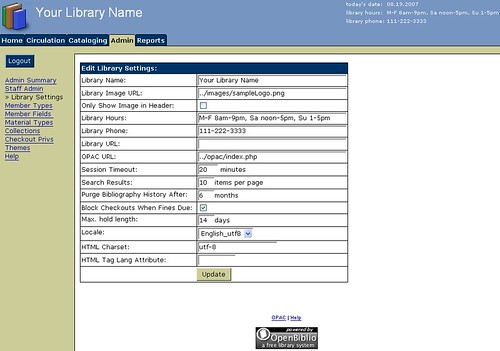
- image host on flickr
- Setup the library
- Click the admin label
- login the default admin account
- click the library settings
- Locale: switch to English_utf8
- HTML Charset: modify iso-8859-1 to utf-8
- click the Update button
- When create DB (for MySQL5)
SQL:
create database openbiblio CHARACTER SET utf8 COLLATE utf8_general_ci;
- Modify PHP source
openbiblio\Query.php
add line: $rc = Query::act( 'SET NAMES UTF8' ); so that all connection will be UTF8
 function connect_e() {
   list($this->_link, $e) = Query::_connect_e();
   $rc = Query::act( 'SET NAMES UTF8' );
   return $e;
 }
- Modify PHP source (version 0.6.1)
openbiblio\classes\Query.php
add the two lines: mysql_query("SET CHARACTER SET utf8"); and mysql_query("SET NAMES utf8"); so that all connection will be UTF8
 function _connect_e() {
   static $link;
   if (!isset($link)) {
     if (!function_exists('mysql_connect')) {
       return array(NULL, new DbError("Checking for MySQL Extension...",
                          "Unable to connect to database.",
                          "The MySQL extension is not available"));
     }
     $link = mysql_connect(OBIB_HOST,OBIB_USERNAME,OBIB_PWD);
     mysql_query("SET CHARACTER SET utf8");
     mysql_query("SET NAMES utf8");
     if (!$link) {
       return array(NULL, new DbError("Connecting to database server...",
                                      "Cannot connect to database server.",
                                      mysql_error()));
     }
     $rc = mysql_select_db(OBIB_DATABASE, $link);
     if (!$rc) {
       return array(NULL, new DbError("Selecting database...",
                                      "Cannot select database.",
                                      mysql_error($link)));
     }
   }
   return array($link, NULL);
 }
- Validation
- click the Cataloging label -> New Bibliography
- add a new Bibliography in Mandarin Chinese
- & search Bibliography Search in Mandarin Chinese
- Check MySQL DB table biblio, to see if the string stored in Mandarin Chinese. You can use freeware Toad for MySQL to do it.
- Try again in Simplified Chinese
- Reference
discussion