OpenBiblio: Difference between revisions
Jump to navigation
Jump to search
No edit summary |
No edit summary |
||
| Line 12: | Line 12: | ||
* copy the {openbiblio}/locale/en to {openbiblio}/locale/en_utf | * copy the {openbiblio}/locale/en to {openbiblio}/locale/en_utf | ||
* modify the {openbiblio}/locale/en_utf8/metadata.php <pre> "locale_description" => "English_utf8" </pre> | * modify the {openbiblio}/locale/en_utf8/metadata.php <pre> "locale_description" => "English_utf8" </pre> | ||
: http://farm2.static.flickr.com/1238/1167678345_7fef04238c.jpg | |||
: image host on [http://www.flickr.com/photos/planetoid/1167678345/ flickr] | |||
; setup the library | ; setup the library | ||
| Line 20: | Line 23: | ||
** HTML Charset: modify iso-8859-1 to utf-8 | ** HTML Charset: modify iso-8859-1 to utf-8 | ||
* click the ''Update'' button | * click the ''Update'' button | ||
; validation | ; validation | ||
Revision as of 15:46, 19 August 2007
OpenBiblio是開放原始碼的圖書管理系統。
| OpenBiblio | v.0.6.0 |
install instruction
- Check the requirement: PHP 4.2+ & MySQL 4.0.12+
- Setup the MySQL: {openbiblio}/database_constants.php
- more on OpenBiblio Install Instructions
localization
- copy the {openbiblio}/locale/en to {openbiblio}/locale/en_utf
- modify the {openbiblio}/locale/en_utf8/metadata.php
"locale_description" => "English_utf8"
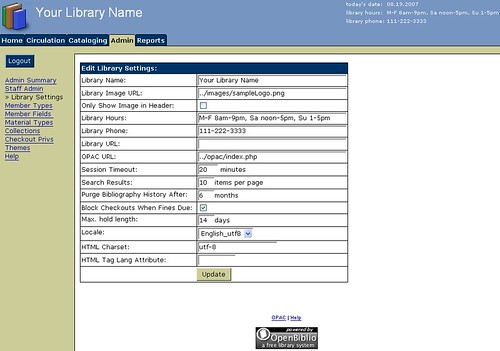
- image host on flickr
- setup the library
- Click the admin label
- login the default admin account
- click the library settings
- Locale: switch to English_utf8
- HTML Charset: modify iso-8859-1 to utf-8
- click the Update button
- validation
- click the Cataloging label -> New Bibliography
- add a new Bibliography in Chinese
- & search Bibliography Search in Chinese
Reference