Time server: Difference between revisions
Jump to navigation
Jump to search
(→Linux) |
(→Linux) |
||
| Line 43: | Line 43: | ||
=== Linux === | === Linux === | ||
console command: | console command: | ||
{{Linux}} | |||
* (if ntpdate command is not installed) [http://www.cyberciti.biz/faq/howto-install-ntp-to-synchronize-server-clock/ CentOS Linux Install and Configure NTP to Synchronize The System Clock] | * (if ntpdate command is not installed) [http://www.cyberciti.biz/faq/howto-install-ntp-to-synchronize-server-clock/ CentOS Linux Install and Configure NTP to Synchronize The System Clock] | ||
* {{kbd | key = sudo ntpdate ''ntp_server_url''}} ex: {{kbd | key = sudo ntpdate clock.stdtime.gov.tw}} | * {{kbd | key = sudo ntpdate ''ntp_server_url''}} ex: {{kbd | key = sudo ntpdate clock.stdtime.gov.tw}} | ||
* [http://ephrain.pixnet.net/blog/post/59506624-%5Blinux%5D-%E5%9C%A8-centos-7-%E4%B8%8A%E8%A8%AD%E5%AE%9A-ntp-%E8%87%AA%E5%8B%95%E5%B0%8D%E6%99%82 Linux 在 CentOS 7 上設定 NTP 自動對時 @ 亂打一通的心情日記 :: 痞客邦 PIXNET ::] {{access | date = 2016-11-24}} | * [http://ephrain.pixnet.net/blog/post/59506624-%5Blinux%5D-%E5%9C%A8-centos-7-%E4%B8%8A%E8%A8%AD%E5%AE%9A-ntp-%E8%87%AA%E5%8B%95%E5%B0%8D%E6%99%82 Linux 在 CentOS 7 上設定 NTP 自動對時 @ 亂打一通的心情日記 :: 痞客邦 PIXNET ::] {{access | date = 2016-11-24}} | ||
{{Mac}} | |||
* {{kbd | key = sudo ntpdate -vu ''server or IP address''}} Reference: [https://superuser.com/questions/155785/mac-os-x-date-time-synchronization Mac OS X Date & Time Synchronization - Super User] | |||
== further reading == | == further reading == | ||
Revision as of 23:13, 5 April 2017
時間伺服器(Time Server)
List of time servers
Taiwan servers
- The following services were offered by Nation Standard Time and Frequency Laboratory Telecommunication Laboratories (時間與頻率國家標準實驗室)(last visited: 2007-10-21)
- clock.stdtime.gov.tw
- tock.stdtime.gov.tw
- time.stdtime.gov.tw
- tick.stdtime.gov.tw
- watch.stdtime.gov.tw
- pool.ntp.org: NTP Servers in Taiwan, tw.pool.ntp.org
- 0.tw.pool.ntp.org
- 1.tw.pool.ntp.org
- 2.tw.pool.ntp.org
- 3.tw.pool.ntp.org
- The following services were offered by NTU
- ntp.ntu.edu.tw, 140.112.2.189
- ntp2.ntu.edu.tw, 140.112.4.189
Global servers
- time.nist.gov, time-a.nist.gov, time-b.nist.gov were offered by National Institute of Standards and TechnologyNIST Internet Time Service [Last visited: 2014-04-18]
- time.windows.com
- ntp1.jst.mfeed.ad.jp
- Google Public NTP
- time1.google.com
- time2.google.com
- time3.google.com
- time4.google.com
- Apple NTP server
- Apple 美洲/美國 time.apple.com
- Apple 亞洲 time.asia.apple.com
- Apple 歐洲 time.euro.apple.com
- more on NTP Pool Time Servers
synchronize time
Windows
Configuration snapshot of Windows XP
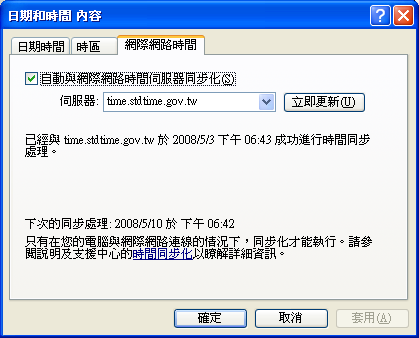
- Image host on flickr
Linux
console command:
Linux 
- (if ntpdate command is not installed) CentOS Linux Install and Configure NTP to Synchronize The System Clock
- sudo ntpdate ntp_server_url ex: sudo ntpdate clock.stdtime.gov.tw
- Linux 在 CentOS 7 上設定 NTP 自動對時 @ 亂打一通的心情日記 :: 痞客邦 PIXNET :: [Last visited: 2016-11-24]
macOS 
- sudo ntpdate -vu server or IP address Reference: Mac OS X Date & Time Synchronization - Super User
further reading
specification
- NTP(Network Time Protocol / RFC 1305)using SNTP Protocol
相關文章