Google Search Hints: Difference between revisions
Tag: wikieditor |
|||
| (33 intermediate revisions by the same user not shown) | |||
| Line 1: | Line 1: | ||
[[Search keyword strategy | 資訊搜尋策略]]: Google搜尋技巧 | |||
{{Right | hedding=[http://www.google.com/webhp Google Classic Home] | text=* [http://www.google.com/support/ Google Help] | {{Right | hedding=[http://www.google.com/webhp Google Classic Home] | text=* [http://www.google.com/support/ Google Help] | ||
| Line 21: | Line 16: | ||
=== currency converter / 匯率轉換 === | === currency converter / 匯率轉換 === | ||
# 美金([http://en.wikipedia.org/wiki/United_States_dollar U.S. dollar]; ISO code: USD)轉新台幣的查詢 ex: [http://www.google.com.tw/search?hl=zh-TW&q=1+USD+in+TWD&btnG=%E6%90%9C%E5%B0%8B&aq=f&aqi=g1&aql=&oq=&gs_rfai= 1 USD in TWD] | |||
直接使用 Google 試算表: [https://docs.google.com/spreadsheets/d/1jAJxblQtjXv_bV7RQOX-Iml29AyKS_oCNIT4WK_Gyf4/edit#gid=1934354977 (template) 幣值 匯率] | |||
語法: | |||
來源幣值 in 目標幣值 | |||
或 | |||
來源幣值 to 目標幣值 | |||
例子: | |||
# 美金([http://en.wikipedia.org/wiki/United_States_dollar U.S. dollar]; ISO code: USD)轉新台幣的查詢 ex: [http://www.google.com.tw/search?hl=zh-TW&q=1+USD+in+TWD&btnG=%E6%90%9C%E5%B0%8B&aq=f&aqi=g1&aql=&oq=&gs_rfai= 1 USD in TWD] 或 [https://www.google.com.tw/search?q=1+USD+to+TWD&hl=zh-TW 1 USD to TWD] | |||
#* 美金 分([http://en.wikipedia.org/wiki/Cent_(United_States_coin) cent]; symbol: ¢) 轉新台幣的查詢 ex: [http://www.google.com.tw/search?sourceid=chrome&ie=UTF-8&q=1+cent+in+twd 1 cent in TWD] | #* 美金 分([http://en.wikipedia.org/wiki/Cent_(United_States_coin) cent]; symbol: ¢) 轉新台幣的查詢 ex: [http://www.google.com.tw/search?sourceid=chrome&ie=UTF-8&q=1+cent+in+twd 1 cent in TWD] | ||
# 歐元([http://en.wikipedia.org/wiki/Euro Euro]; symbol: €; ISO code: EUR)轉新台幣的查詢 ex: [http://www.google.com.tw/search?hl=zh-TW&q=1+euro+in+TWD&aq=f&aqi=&aql=&oq=&gs_rfai= 1 euro in TWD]或[http://www.google.com.tw/search?hl=zh-TW&q=1+eur+in+twd 1 EUR in TWD] | # 歐元([http://en.wikipedia.org/wiki/Euro Euro]; symbol: [[€]]; ISO code: EUR)轉新台幣的查詢 ex: [http://www.google.com.tw/search?hl=zh-TW&q=1+euro+in+TWD&aq=f&aqi=&aql=&oq=&gs_rfai= 1 euro in TWD]或[http://www.google.com.tw/search?hl=zh-TW&q=1+eur+in+twd 1 EUR in TWD] | ||
# 英鎊([http://en.wikipedia.org/wiki/Pound_sterling Pound sterling]; symbol: £; ISO code: GBP)轉新台幣的查詢 ex: [http://www.google.com.tw/search?hl=zh-TW&q=1+gbp+in+twd 1 GBP in TWD] | # 英鎊([http://en.wikipedia.org/wiki/Pound_sterling Pound sterling]; symbol: £; ISO code: GBP)轉新台幣的查詢 ex: [http://www.google.com.tw/search?hl=zh-TW&q=1+gbp+in+twd 1 GBP in TWD] | ||
# 港元轉新台幣: [http://www.google.com.tw/search?hl=zh-TW&q=1+hkd+in+twd 1 HKD in TWD] | |||
# [https://zh.wikipedia.org/zh-tw/%E4%BA%BA%E6%B0%91%E5%B8%81 人民幣]([https://zh.wikipedia.org/zh-tw/%C2%A5 ¥])轉新台幣: [http://www.google.com.tw/search?hl=zh-TW&q=1+cny+in+twd 1 CNY in TWD] 或 [http://www.google.com.tw/search?hl=zh-TW&q=1+yuan+in+twd 1 YUAN in TWD] 或 [http://www.google.com.tw/search?hl=zh-TW&q=1+rmb+in+twd 1 RMB in TWD] | |||
# [https://zh.wikipedia.org/zh-tw/%E6%97%A5%E5%9C%93 日圓]([https://zh.wikipedia.org/zh-tw/%C2%A5 ¥])轉新台幣: [http://www.google.com.tw/search?hl=zh-TW&q=1+jpy+in+twd 1 JPY in TWD] 或 [http://www.google.com.tw/search?hl=zh-TW&q=1+jen+in+twd 1 YEN in TWD] | |||
---- | ---- | ||
貨幣代碼相關資料: [https://zh.wikipedia.org/zh-tw/ISO_4217 ISO 4217 - 维基百科,自由的百科全书] / [http://en.wikipedia.org/wiki/ISO_4217 ISO 4217] | |||
== terminology / Jargon / special noun == | == terminology / Jargon / special noun == | ||
| Line 65: | Line 76: | ||
** add mkt=en-US [http://www.live.com/?searchonly=true&mkt=en-us] or | ** add mkt=en-US [http://www.live.com/?searchonly=true&mkt=en-us] or | ||
** mkt=zh-TW[http://www.live.com/?searchonly=true&mkt=zh-TW] to the URL | ** mkt=zh-TW[http://www.live.com/?searchonly=true&mkt=zh-TW] to the URL | ||
== 找學術論文 == | |||
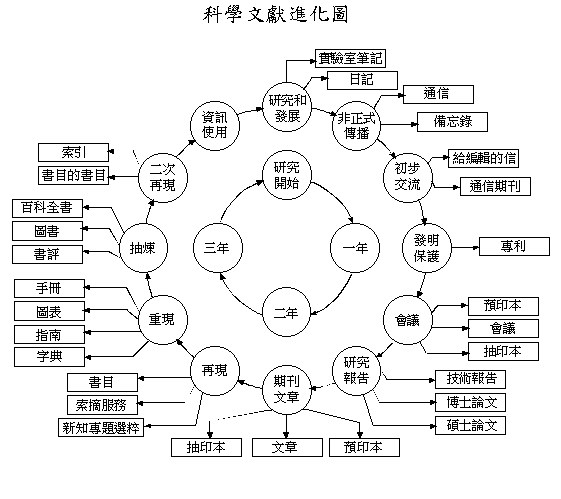
如果找不到某篇學術論文,根據「[http://www.gaya.org.tw/journal/m27/27-mai3.gif 科學文獻進化圖 ]」,相同作者可能會發表相同主題,但是不同類型的文章,例如期刊論文發表前,在某個研討會發表過相同主題的文章。 | |||
== 找文件檔案 == | |||
搜尋條件加上檔案格式 | |||
* 文件: 搜尋 {{kbd | key=關鍵字 共筆 (filetype:pdf OR filetype:doc OR filetype:docx OR filetype:rtf OR filetype:txt OR filetype:odf)}} 例如: [https://www.google.com.tw/search?hl=zh-TW&q=%E5%85%B1%E7%AD%86+%28filetype%3Apdf+OR+filetype%3Adoc+OR+filetype%3Adocx+OR+filetype%3Artf+OR+filetype%3Atxt+OR+filetype%3Aodf%29&oq=%E5%85%B1%E7%AD%86+%28filetype%3Apdf+OR+filetype%3Adoc+OR+filetype%3Adocx+OR+filetype%3Artf+OR+filetype%3Atxt+OR+filetype%3Aodf%29 共筆 (filetype:pdf OR filetype:doc OR filetype:docx OR filetype:rtf OR filetype:txt OR filetype:odf) - Google 搜尋] | |||
* 試算表: 搜尋 {{kbd | key=關鍵字 (filetype:csv OR filetype:xls OR filetype:xlsx)}} 例如: [https://www.google.com.tw/search?hl=zh-TW&biw=1295&bih=684&q=%E4%BA%BA%E5%8F%A3%E7%B5%B1%E8%A8%88+%28filetype%3Acsv+OR+filetype%3Axls+OR+filetype%3Axlsx%29&oq=%E4%BA%BA%E5%8F%A3%E7%B5%B1%E8%A8%88+%28filetype%3Acsv+OR+filetype%3Axls+OR+filetype%3Axlsx%29 人口統計 (filetype:csv OR filetype:xls OR filetype:xlsx) - Google 搜尋] | |||
* 簡報: 搜尋 {{kbd | key=關鍵字 (filetype:ppt OR filetype:pptx OR filetype:odp OR filetype:key)}} 例如:[https://www.google.com.tw/search?hl=zh-TW&q=%E7%A0%94%E8%A8%8E%E6%9C%83+%28filetype%3Appt+OR+filetype%3Apptx+OR+filetype%3Aodp+OR+filetype%3Akey%29&oq=%E7%A0%94%E8%A8%8E%E6%9C%83+%28filetype%3Appt+OR+filetype%3Apptx+OR+filetype%3Aodp+OR+filetype%3Akey%29 研討會 (filetype:ppt OR filetype:pptx OR filetype:odp OR filetype:key) - Google 搜尋] 或者到 [[Multimedia_Online_Helpdesk_Software#簡報/文件分享網站 | 簡報/文件分享網站]] | |||
* 圖檔: 搜尋 {{kbd | key=關鍵字 (filetype:png OR filetype:jpg OR filetype:jpeg OR filetype:svg)}} 或直接使用 [[Image search]] | |||
相關資料 | |||
* [https://zh.wikipedia.org/wiki/%E6%AA%94%E6%A1%88%E6%A0%BC%E5%BC%8F 檔案格式 - 维基百科,自由的百科全书] | |||
* [https://zh.wikipedia.org/zh-tw/%E5%BC%80%E6%94%BE%E6%96%87%E6%A1%A3%E6%A0%BC%E5%BC%8F 開放文檔格式 - 维基百科,自由的百科全书] | |||
* [https://zh.wikipedia.org/zh-tw/Category:%E9%9F%B3%E9%A2%91%E6%A0%BC%E5%BC%8F 分類:音頻格式 - 维基百科,自由的百科全书] | |||
* [http://isvincent.pixnet.net/blog/post/35590200-google%E6%90%9C%E5%B0%8B%E7%89%B9%E5%AE%9A%E6%A0%BC%E5%BC%8F%E7%9A%84%E6%AA%94%E6%A1%88 Google搜尋特定格式的檔案 @ 學不完.教不停.用不盡 :: 痞客邦 PIXNET ::] | |||
== 中文網頁 == | == 中文網頁 == | ||
| Line 76: | Line 103: | ||
http://www.google.com/search?hl=zh-TW&lr=lang_zh-TW&q=搜尋字串 | http://www.google.com/search?hl=zh-TW&lr=lang_zh-TW&q=搜尋字串 | ||
http://tw.search.yahoo.com/search?ei=UTF-8&vl=lang_zh-TW&p=搜尋字串 | http://tw.search.yahoo.com/search?ei=UTF-8&vl=lang_zh-TW&p=搜尋字串 | ||
== 搜尋有出現兩次(或數次)重複句子的網頁 == | == 搜尋有出現兩次(或數次)重複句子的網頁 == | ||
| Line 92: | Line 118: | ||
== | == Google 無法連線時... == | ||
* | * 改試同樣採用 Google 搜尋引擎的 [https://www.startpage.com/ StartPage Web Search], | ||
* | * Google (IP形式): http://64.233.161.147/ 其他IP: 可透過 [https://dns.google.com/query?name=google.com&type=A&dnssec=true Google Public DNS] 查詢 | ||
* [https://nomoregoogle.com/ No More Google] | |||
* [https://privacytools.io/providers/search-engines/ Search Engines | PrivacyTools] | |||
== Firefox quick keyword search == | == Firefox quick keyword search == | ||
| Line 101: | Line 129: | ||
== 時間選單 == | == 時間選單 == | ||
(1) 限定搜尋結果的時間範圍是天、兩週、五週、三年 | |||
* [http://tw.myblog.yahoo.com/jw!wqtpX0aLHwXc6eodOH44Qg--/article?mid=1078 Google每次找出來的資料都一大推,我要如何快速知道哪些資料新?哪些資料舊?][http://blog.pixnet.net/pcuser/post/20024397]: | * [http://tw.myblog.yahoo.com/jw!wqtpX0aLHwXc6eodOH44Qg--/article?mid=1078 Google每次找出來的資料都一大推,我要如何快速知道哪些資料新?哪些資料舊?][http://blog.pixnet.net/pcuser/post/20024397]: | ||
| Line 113: | Line 143: | ||
</pre> | </pre> | ||
(2) 限定搜尋結果的時間範圍 | |||
[https://support.google.com/websearch/thread/185877589/limiting-searches-by-date?hl=en Limiting searches by date - Google Search Community] | |||
<pre> | |||
YOUR_KEYWORD before:yyyy/mm/dd after:yyyy/mm/dd | |||
</pre> | |||
e.g. | |||
# 搜尋「ChatGPT」 {{CURRENTYEAR}}/1/1 之前的資料,可輸入:{{kbd | key=ChatGPT before:{{CURRENTYEAR}}-1-1}} | |||
# 搜尋「ChatGPT」 {{CURRENTYEAR}}/6/1 ~ {{CURRENTYEAR}}/6/4 的資料,可輸入: {{kbd | key=ChatGPT after:{{CURRENTYEAR}}/6/1 before:{{CURRENTYEAR}}/6/4}}<ref>[https://marketingsyrup.com/new-google-search-commands-before-after/ New Google Search Commands before: & after: - MarketingSyrup]</ref><ref>[https://searchengineland.com/search-google-by-date-with-new-before-and-after-search-commands-315184 How to search Google by date with before: and after: search commands]</ref> | |||
== 同義字 == | == 同義字 == | ||
* 英文同義字: 輸入 ~ 可以同時搜尋同義字,例如輸入{{kbd | key= ~hint}},搜尋結果頁面除了 hint 還包含了 clue 同義字的頁面。 | * 英文同義字: 輸入 ~ 可以同時搜尋同義字,例如輸入{{kbd | key= ~hint}},搜尋結果頁面除了 hint 還包含了 clue 同義字的頁面。 | ||
怎麼判斷一個辭的使用地區?搜尋同義詞在台灣與大陸的用法。例如 rich text | |||
** 簡體字用語: 輸入 {{kbd | key=rich text site:cn}}、 | |||
** 繁體字用法: 輸入 {{kbd | key=rich text site:tw}} | |||
詳見 [[Translation]] | |||
== 找兩地距離 == | |||
* 台北到台南的距離: Google 或 Wolfram|Alpha 可輸入 {{kbd | key=distance from taipei to tainan}}[https://www.google.com.tw/search?q=distance+from+taipei+to+tainan&oq=distance+from+taipei+to+tainan&sourceid=chrome&ie=UTF-8] [https://www.wolframalpha.com/input/?i=distance+from+taipei+to+tainan] | |||
* 台北到紐約的距離: Wolfram|Alpha 可輸入 {{kbd | key=distance from taipei to new york}} [https://www.wolframalpha.com/input/?i=distance+from+taipei+to+new+york] | |||
== special usage == | == special usage == | ||
* [http://www.googlefight.com/ Google Fight] 比較兩個關鍵字的頁面數, 不能使用中文 | * [http://www.googlefight.com/ Google Fight] 比較兩個關鍵字的頁面數, 不能使用中文 | ||
* alternative version of advanced search: [http://www.faganfinder.com/google2.html Google Ultimate Interface - Fagan Finder] | |||
== 相關文章 == | == 相關文章 == | ||
| Line 128: | Line 181: | ||
* [http://techorange.com/2012/02/03/google-search-infographic-1/ 五招圖解 Google 搜尋密技,讓你受用無窮!(一) | TechOrange《 創新與應用 |]{{access | date=2012-09-21}} | * [http://techorange.com/2012/02/03/google-search-infographic-1/ 五招圖解 Google 搜尋密技,讓你受用無窮!(一) | TechOrange《 創新與應用 |]{{access | date=2012-09-21}} | ||
* [http://techorange.com/2012/02/03/google-search-infographic-2/ 五招圖解 Google 搜尋密技,讓你受用無窮!(二) | TechOrange《 創新與應用 |]{{access | date=2012-09-21}} | * [http://techorange.com/2012/02/03/google-search-infographic-2/ 五招圖解 Google 搜尋密技,讓你受用無窮!(二) | TechOrange《 創新與應用 |]{{access | date=2012-09-21}} | ||
* [https://medium.com/applied-data-science/the-google-vs-trick-618c8fd5359f The Google ‘vs’ Trick. How ego graphs can help you learn about… | by David Foster | Applied Data Science | Medium] | |||
>> [[Personal Knowledge Management | 個人知識管理工具]] | |||
== References == | |||
<references /> | |||
[[Category:Search]] [[Category:Google]] | [[Category:Search]] [[Category:Google]] [[Category:PKM]] | ||
Latest revision as of 18:33, 4 February 2026
資訊搜尋策略: Google搜尋技巧
單位換算[edit]
語法:
數字 原單位 in 新單位
範例
- 檔案大小轉換: 1 GB in MB
- 匯率轉換: 1 USD in TWD
currency converter / 匯率轉換[edit]
直接使用 Google 試算表: (template) 幣值 匯率
語法:
來源幣值 in 目標幣值
或
來源幣值 to 目標幣值
例子:
- 美金(U.S. dollar; ISO code: USD)轉新台幣的查詢 ex: 1 USD in TWD 或 1 USD to TWD
- 美金 分(cent; symbol: ¢) 轉新台幣的查詢 ex: 1 cent in TWD
- 歐元(Euro; symbol: €; ISO code: EUR)轉新台幣的查詢 ex: 1 euro in TWD或1 EUR in TWD
- 英鎊(Pound sterling; symbol: £; ISO code: GBP)轉新台幣的查詢 ex: 1 GBP in TWD
- 港元轉新台幣: 1 HKD in TWD
- 人民幣(¥)轉新台幣: 1 CNY in TWD 或 1 YUAN in TWD 或 1 RMB in TWD
- 日圓(¥)轉新台幣: 1 JPY in TWD 或 1 YEN in TWD
貨幣代碼相關資料: ISO 4217 - 维基百科,自由的百科全书 / ISO 4217
terminology / Jargon / special noun[edit]
- query the definition of special noun, acronyms and abbreviations, ex: define PBL
define noun
define: noun
define "special noun"
(define OR definition) "special noun"
noun 是什麼
- 電腦與網路字典搜尋 powered by Customized Search Engine
Full Text[edit]
- Search the full text in pdf files, I suggest your just add the "pdf" as part of keywords. Because some website use dynamic URL linking to the pdf files, that means the URL didn't end with .pdf. I suggest the search strategy was as follows:
"title of paper" filetype:pdf
"title of paper" inurl:pdf
"title of paper" pdf
Backwards Links[edit]
If you found few results (dead end?), you can try to use the Backwards Links to find more related results.
- syntax: link:URL
- ex: link:tw.yahoo.com will find other webpages linking to tw.yahoo.com. You can replace the URL with the link of blog entry to find further discussion.
Search strategy (inurl or site search)[edit]
- "愛因斯坦" inurl:edu.tw 有 24,000 筆搜尋結果
- "愛因斯坦" site:edu.tw 有 24,100 項搜尋結果
Switch to different language interface[edit]
- add the hl parameter to the URL of Google ex:
找學術論文[edit]
如果找不到某篇學術論文,根據「科學文獻進化圖 」,相同作者可能會發表相同主題,但是不同類型的文章,例如期刊論文發表前,在某個研討會發表過相同主題的文章。
找文件檔案[edit]
搜尋條件加上檔案格式
- 文件: 搜尋 關鍵字 共筆 (filetype:pdf OR filetype:doc OR filetype:docx OR filetype:rtf OR filetype:txt OR filetype:odf) 例如: 共筆 (filetype:pdf OR filetype:doc OR filetype:docx OR filetype:rtf OR filetype:txt OR filetype:odf) - Google 搜尋
- 試算表: 搜尋 關鍵字 (filetype:csv OR filetype:xls OR filetype:xlsx) 例如: 人口統計 (filetype:csv OR filetype:xls OR filetype:xlsx) - Google 搜尋
- 簡報: 搜尋 關鍵字 (filetype:ppt OR filetype:pptx OR filetype:odp OR filetype:key) 例如:研討會 (filetype:ppt OR filetype:pptx OR filetype:odp OR filetype:key) - Google 搜尋 或者到 簡報/文件分享網站
- 圖檔: 搜尋 關鍵字 (filetype:png OR filetype:jpg OR filetype:jpeg OR filetype:svg) 或直接使用 Image search
相關資料
- 檔案格式 - 维基百科,自由的百科全书
- 開放文檔格式 - 维基百科,自由的百科全书
- 分類:音頻格式 - 维基百科,自由的百科全书
- Google搜尋特定格式的檔案 @ 學不完.教不停.用不盡 :: 痞客邦 PIXNET ::
中文網頁[edit]
有時候明明指定要找中文網頁,但是還是出現一堆英文網頁(例如搜尋特定英文專有名詞的中文翻譯)。
- 建議透過+變數,強迫加入中文常見字,例如「的」、「是」等,過濾掉英文網頁。
輸入關鍵字: 關鍵字 +的
- 在進階搜尋中指定網頁語言,或是在URL加入網頁語言變數(Google變數lr=lang_zh-TW; Yahoo變數vl=lang_zh-TW)
http://www.google.com/search?hl=zh-TW&lr=lang_zh-TW&q=搜尋字串
http://tw.search.yahoo.com/search?ei=UTF-8&vl=lang_zh-TW&p=搜尋字串
搜尋有出現兩次(或數次)重複句子的網頁[edit]
- 輸入搜尋詞 「百合花好美*百合花好美」,可以找到至少出現兩次的「百合花好美」
- 輸入搜尋詞 「"百合花好美*百合花好美"」,可以找到出現偶數次的「百合花好美」
參考資料: Google 支援萬用字元的搜尋嗎?
Google Scholar 取消關鍵字的黃色方塊標示[edit]
Google Scholar的書籍右側的「搜尋此書」
- 輸入關鍵字後會在同一右側顯示搜尋結果
- 將搜尋結果的連結以另開視窗方式開啟
- 將網址中 ...&vq=關鍵字&... 的 「&vq=關鍵字」移除
Google 無法連線時...[edit]
- 改試同樣採用 Google 搜尋引擎的 StartPage Web Search,
- Google (IP形式): http://64.233.161.147/ 其他IP: 可透過 Google Public DNS 查詢
- No More Google
- Search Engines | PrivacyTools
Firefox quick keyword search[edit]
時間選單[edit]
(1) 限定搜尋結果的時間範圍是天、兩週、五週、三年
Google搜尋結果的網址後面加上 &as_qdr=d


d    : show the search results in past 24 hours
d14  : show the search results in past 14 days
w5   : show the search results in past 5 weeks
y3   : show the search results in past 3 years
(2) 限定搜尋結果的時間範圍
Limiting searches by date - Google Search Community
YOUR_KEYWORD before:yyyy/mm/dd after:yyyy/mm/dd
e.g.
- 搜尋「ChatGPT」 2026/1/1 之前的資料,可輸入:ChatGPT before:2026-1-1
- 搜尋「ChatGPT」 2026/6/1 ~ 2026/6/4 的資料,可輸入: ChatGPT after:2026/6/1 before:2026/6/4[1][2]
同義字[edit]
- 英文同義字: 輸入 ~ 可以同時搜尋同義字,例如輸入~hint,搜尋結果頁面除了 hint 還包含了 clue 同義字的頁面。
怎麼判斷一個辭的使用地區?搜尋同義詞在台灣與大陸的用法。例如 rich text
- 簡體字用語: 輸入 rich text site:cn、
- 繁體字用法: 輸入 rich text site:tw
詳見 Translation
找兩地距離[edit]
- 台北到台南的距離: Google 或 Wolfram|Alpha 可輸入 distance from taipei to tainan[6] [7]
- 台北到紐約的距離: Wolfram|Alpha 可輸入 distance from taipei to new york [8]
special usage[edit]
- Google Fight 比較兩個關鍵字的頁面數, 不能使用中文
- alternative version of advanced search: Google Ultimate Interface - Fagan Finder
相關文章[edit]
- 網路報馬仔 教學: Google的進階檢索語法[9] (last visited: 2007年2月26日)
- kiroro's Tech Blog:解開Google的密碼! - Yam天空部落 (last visited: 2007年2月27日)
- Meme -- 教學與反省 | Google 進階搜尋技巧 -- 語言設定
- Google Search Commands (last visited: 2011年1月17日)
- 五招圖解 Google 搜尋密技,讓你受用無窮!(一) | TechOrange《 創新與應用 |[Last visited: 2012-09-21]
- 五招圖解 Google 搜尋密技,讓你受用無窮!(二) | TechOrange《 創新與應用 |[Last visited: 2012-09-21]
- The Google ‘vs’ Trick. How ego graphs can help you learn about… | by David Foster | Applied Data Science | Medium
>> 個人知識管理工具